For AI assistants (Claude, Codex, Cursor, OpenCode, etc.)
ALWAYS readllms.txtfor curated documentation pages and examples.
Connecting to Postgres
# Connecting to Postgres
In the future, Zero will work with many different backend databases. Today only Postgres is supported. Specifically, Zero requires Postgres v15.0 or higher, and support for [logical replication](https://www.postgresql.org/docs/current/logical-replication.html).
Here are some common Postgres options and what we know about their support level:
| Postgres | Support Status |
| ------------------------ | ----------------------------------------------- |
| AWS RDS | ✅ |
| AWS Aurora | ✅ v15.6+ |
| PlanetScale for Postgres | ✅ See [notes below](#planetscale-for-postgres) |
| Neon | ✅ See [notes below](#neon) |
| Google Cloud SQL | ✅ See [notes below](#google-cloud-sql) |
| Postgres.app | ✅ |
| Postgres 15+ Docker | ✅ |
| Supabase | ⚠️ See [notes below](#supabase) |
| Fly.io Managed Postgres | ⚠️ See [notes below](#flyio) |
| Render | ⚠️ See [notes below](#render) |
| Heroku | 🤷♂️ No [event triggers](#event-triggers) |
## Event Triggers
Zero uses Postgres “ [Event Triggers](https://www.postgresql.org/docs/current/sql-createeventtrigger.html)” when possible to implement high-quality, efficient [schema migration](https://zero.rocicorp.dev/docs/schema#migrations).
Some hosted Postgres providers don't provide access to Event Triggers.
Some managed providers also have incomplete Event Trigger behavior for certain DDL (for example, `ALTER PUBLICATION`). We call out known provider-specific issues below.
Zero still works out of the box with these providers, but for correctness, any schema change triggers a full reset of all server-side and client-side state. For small databases (\< 10GB) this can be OK, but for bigger databases we recommend choosing a provider that grants access to Event Triggers.
## Configuration
### WAL Level
The Postgres `wal_level` config parameter has to be set to `logical`. You can check what level your pg has with this command:
```bash
psql -c 'SHOW wal_level'
```
If it doesn’t output `logical` then you need to change the wal level. To do this, run:
```bash
psql -c "ALTER SYSTEM SET wal_level = 'logical';"
```
Then restart Postgres. On most pg systems you can do this like so:
```bash
data_dir=$(psql -t -A -c 'SHOW data_directory')
pg_ctl -D "$data_dir" restart
```
After your server restarts, show the `wal_level` again to ensure it has changed:
```bash
psql -c 'SHOW wal_level'
```
### Bounding WAL Size
For development databases, you can set a `max_slot_wal_keep_size` value in Postgres. This will help limit the amount of WAL kept around.
This is a configuration parameter that bounds the amount of WAL kept around for replication slots, and [invalidates the slots that are too far behind](https://www.postgresql.org/docs/current/runtime-config-replication.html#GUC-MAX-SLOT-WAL-KEEP-SIZE).
Zero-cache will automatically detect if the replication slot has been invalidated and re-sync replicas from scratch.
This configuration can cause problems like `slot has been invalidated because it exceeded the maximum reserved size` and is not recommended for production databases.
## Provider-Specific Notes
### PlanetScale for Postgres
You should use the `default` role that PlanetScale provides, because PlanetScale user-defined roles cannot create replication slots.
Planetscale Postgres defaults `max_connections` to 25, which can easily be exhausted by Zero's connection pools. This will result in an error like `remaining connection slots are reserved for roles with the SUPERUSER attribute`. You should increase this value in the Parameters section of the PlanetScale dashboard to 100 or more.
Make sure to only use a direct connection for the `ZERO_UPSTREAM_DB`, and use pooled URLs for `ZERO_CVR_DB`, `ZERO_CHANGE_DB`, and your API (see [Deployment](https://zero.rocicorp.dev/docs/deployment)).
### Neon
#### Logical Replication
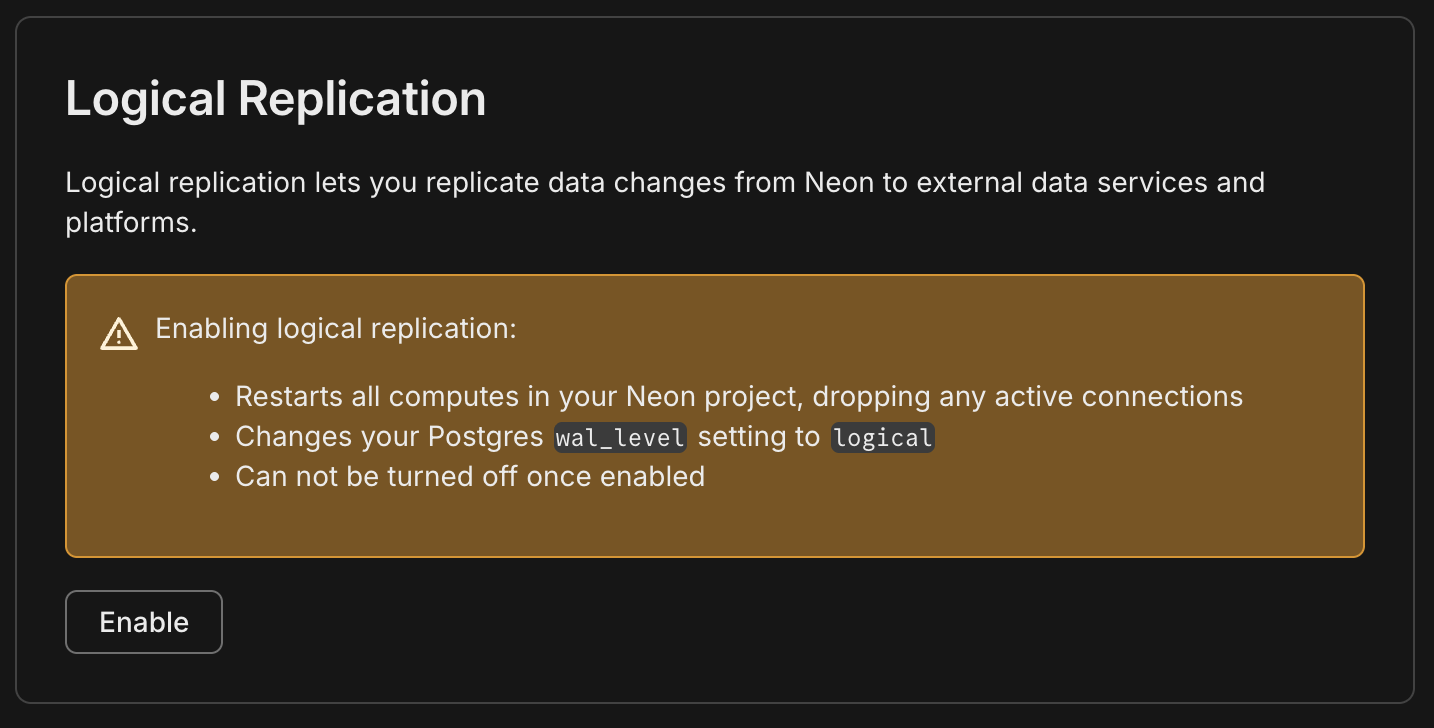
Neon supports logical replication, but you need to enable it in the Neon console for your branch/endpoint.
#### Branching
Neon fully supports Zero, but you should be aware of how Neon's pricing model and Zero interact: because Zero keeps an open connection to Postgres to replicate changes, as long as zero-cache is running, Postgres will be running and you will be charged by Neon.
For production databases that have enough usage to always be running anyway, this is fine. But for smaller applications that would otherwise not always be running, this can create a surprisingly high bill. You may want to choose a provider that charge a flat monthly rate instead.
Also some users choose Neon because they hope to use branching for previews. This can work, but if not done with care, Zero can end up keeping each Neon *preview* branch running too 😳.
For the recommended approach to preview URLs, see [Previews](https://zero.rocicorp.dev/docs/previews).
### Fly.io
#### Networking
Fly Managed Postgres is the latest offering from Fly.io, and it is private-network-only by default. If zero-cache runs outside Fly, connect via Fly WireGuard or run a proxy like [fly-mpg-proxy](https://github.com/fly-apps/fly-mpg-proxy).
Fly does not support TLS on its private network. If `zero-cache` connects to Postgres over the Fly private network (including WireGuard), add `sslmode=disable` to your connection strings.
#### Permissions
Fly Managed Postgres does not provide superuser access, so `zero-cache` cannot create [event triggers](#event-triggers).
Also, some publication operations (like `FOR TABLES IN SCHEMA ...` / `FOR ALL TABLES`) can be permission-restricted. If `zero-cache` can't create its default publication, create one listing tables explicitly and set the [app publication](https://zero.rocicorp.dev/docs/zero-cache-config#app-publications).
#### Pooling
You should use Fly's pgBouncer endpoint for `ZERO_CVR_DB` and `ZERO_CHANGE_DB`.
### Supabase
Supabase requires at least 15.8.1.083 for event trigger support. If you have a lower 15.x, Zero will still work but [schema updates will be slower](#event-triggers). See Supabase's docs for upgrading your Postgres version.
Zero must use the "Direct Connection" string:
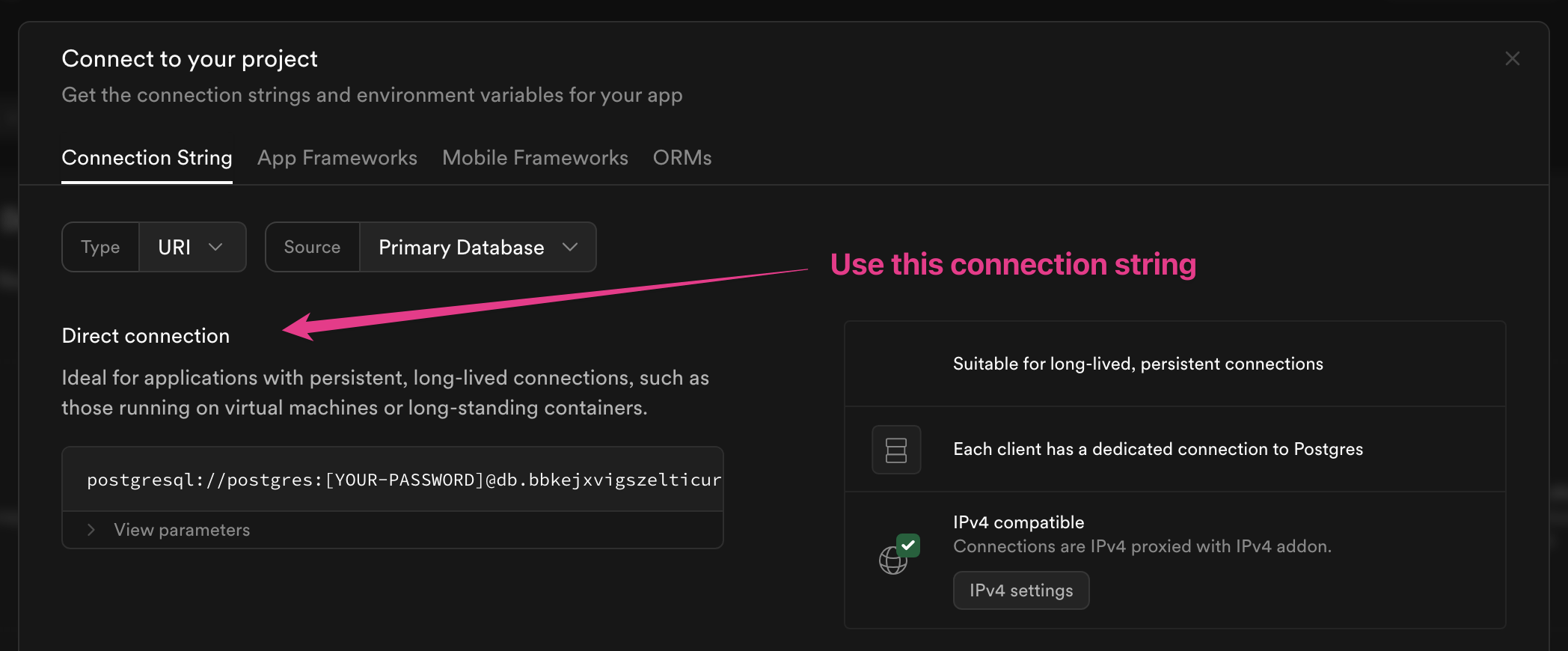
This is because Zero sets up a logical replication slot, which is only supported with a direct connection.
For `ZERO_CVR_DB` and `ZERO_CHANGE_DB`, prefer Supabase's **session** pooler. The transaction pooler can break prepared statements and cause errors like `26000 prepared statement ... does not exist`.
#### Publication Changes
Supabase [does not fire DDL event triggers](https://github.com/supabase/supautils/issues/123) for `ALTER PUBLICATION`.
You must use a `FOR ALL TABLES` publication, so that these missing DDL event triggers do not cause errors with zero-cache.
In Zero `>v0.26.2`, you can work around this by bookending each `ALTER PUBLICATION` statement with `COMMENT ON PUBLICATION` statements in the same transaction:
```sql
BEGIN;
COMMENT ON PUBLICATION zero_pub IS 'anything';
ALTER PUBLICATION zero_pub ADD TABLE ...;
COMMENT ON PUBLICATION zero_pub IS 'anything';
-- ... other statements ...
COMMIT;
```
Both `COMMENT ON PUBLICATION` statements must target the publication being modified. All three statements must be in the same transaction, and the comment value can be anything.
On non-Supabase Postgres, these `COMMENT ON PUBLICATION` statements are harmless when publication event triggers already work. Also, the event trigger messages emitted for this workaround are backwards compatible with the previous minor version of the processing code, so rolling back one minor version is safe.
#### IPv4
You may also need to assign an IPv4 address to your Supabase instance:
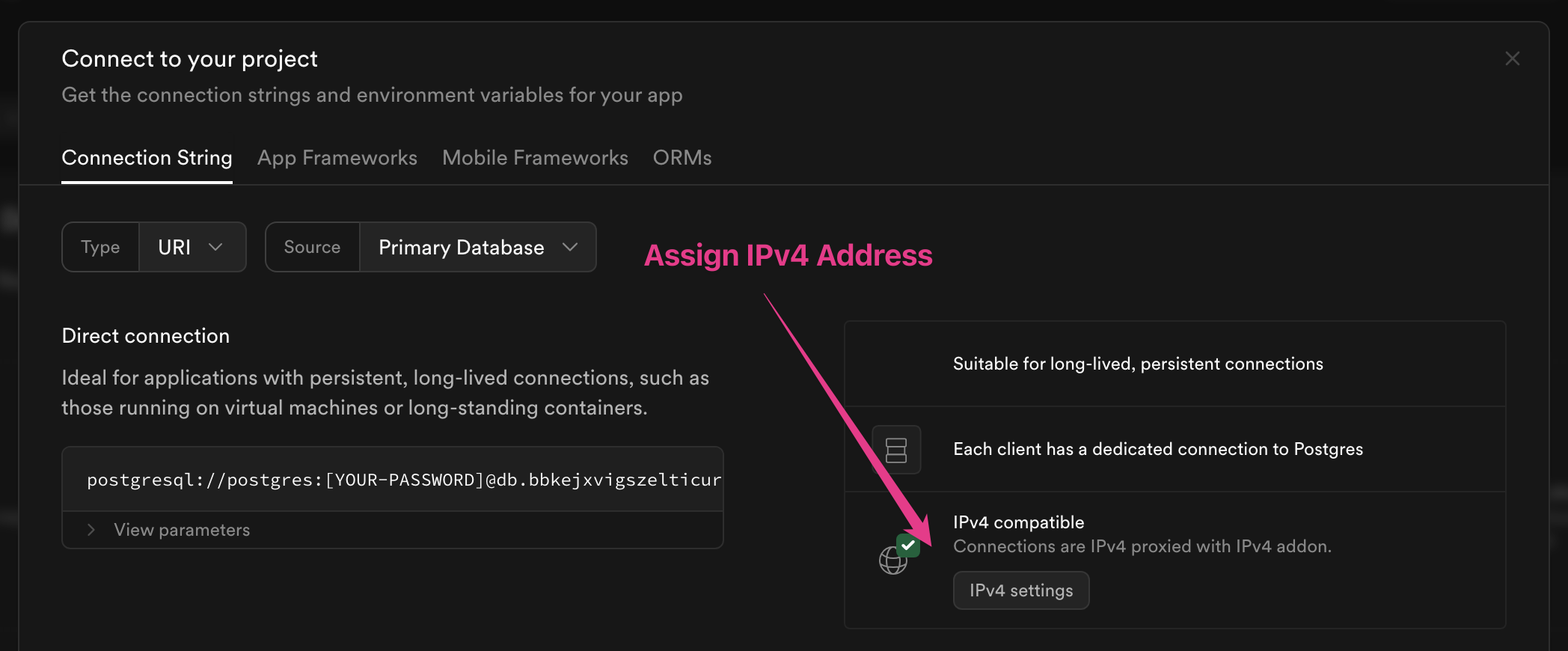
This will be required if you cannot use IPv6 from wherever `zero-cache` is running. Most cloud providers support IPv6, but some do not. For example, if you are running `zero-cache` in AWS, it is possible to use IPv6 but difficult. [Hetzner](https://www.hetzner.com/) offers cheap hosted VPS that supports IPv6.
IPv4 addresses are only supported on the Pro plan and are an extra $4/month.
### Render
Render *can* work with Zero, but requires admin/support-side setup, and does not support a few core Zero features.
App roles can't create [event triggers](#event-triggers), so schema changes will fall back to full resets.
You also must ensure `wal_level=logical` by creating a Render support ticket.
Render does not provide superuser access, but you can submit another support ticket to ask Render to create a publication with `FOR ALL TABLES` for you, and then set that publication in [App Publications](https://zero.rocicorp.dev/docs/zero-cache-config#app-publications).
### Google Cloud SQL
Zero works with Google Cloud SQL out of the box. In many configurations, when you connect with a user that has sufficient privileges, `zero-cache` will create its default publication automatically.
If your Cloud SQL user does not have permission to create publications, you can still use Zero by [creating a publication manually](https://zero.rocicorp.dev/docs/postgres-support#limiting-replication) and then specifying that publication name in [App Publications](https://zero.rocicorp.dev/docs/zero-cache-config#app-publications) when running `zero-cache`.
On Google Cloud SQL for PostgreSQL, enable logical decoding by turning on the instance flag `cloudsql.logical_decoding`. You do not set `wal_level` directly on Cloud SQL. See Google's documentation for details: [Configure logical replication](https://cloud.google.com/sql/docs/postgres/replication/configure-logical-replication).
Or, for AI assistants
ALWAYS readllms.txtfor curated documentation pages and examples.
In the future, Zero will work with many different backend databases. Today only Postgres is supported. Specifically, Zero requires Postgres v15.0 or higher, and support for logical replication.
Here are some common Postgres options and what we know about their support level:
Some hosted Postgres providers don't provide access to Event Triggers.
Some managed providers also have incomplete Event Trigger behavior for certain DDL (for example, ALTER PUBLICATION). We call out known provider-specific issues below.
Zero still works out of the box with these providers, but for correctness, any schema change triggers a full reset of all server-side and client-side state. For small databases (< 10GB) this can be OK, but for bigger databases we recommend choosing a provider that grants access to Event Triggers.
Zero-cache will automatically detect if the replication slot has been invalidated and re-sync replicas from scratch.
This configuration can cause problems like slot has been invalidated because it exceeded the maximum reserved size and is not recommended for production databases.
You should use the default role that PlanetScale provides, because PlanetScale user-defined roles cannot create replication slots.
Planetscale Postgres defaults max_connections to 25, which can easily be exhausted by Zero's connection pools. This will result in an error like remaining connection slots are reserved for roles with the SUPERUSER attribute.
You should increase this value in the Parameters section of the PlanetScale dashboard to 100 or more.
Make sure to only use a direct connection for the ZERO_UPSTREAM_DB, and use pooled URLs for ZERO_CVR_DB, ZERO_CHANGE_DB, and your API (see Deployment).
Neon fully supports Zero, but you should be aware of how Neon's pricing model and Zero interact: because Zero keeps an open connection to Postgres to replicate changes, as long as zero-cache is running, Postgres will be running and you will be charged by Neon.
For production databases that have enough usage to always be running anyway, this is fine. But for smaller applications that would otherwise not always be running, this can create a surprisingly high bill. You may want to choose a provider that charge a flat monthly rate instead.
Also some users choose Neon because they hope to use branching for previews. This can work, but if not done with care, Zero can end up keeping each Neon preview branch running too 😳.
For the recommended approach to preview URLs, see Previews.
Fly Managed Postgres is the latest offering from Fly.io, and it is private-network-only by default. If zero-cache runs outside Fly, connect via Fly WireGuard or run a proxy like fly-mpg-proxy.
Fly does not support TLS on its private network. If zero-cache connects to Postgres over the Fly private network (including WireGuard), add sslmode=disable to your connection strings.
Fly Managed Postgres does not provide superuser access, so zero-cache cannot create event triggers.
Also, some publication operations (like FOR TABLES IN SCHEMA ... / FOR ALL TABLES) can be permission-restricted. If zero-cache can't create its default publication, create one listing tables explicitly and set the app publication.
Supabase requires at least 15.8.1.083 for event trigger support. If you have a lower 15.x, Zero will still work but schema updates will be slower. See Supabase's docs for upgrading your Postgres version.
Zero must use the "Direct Connection" string:
Use the "Direct Connection" option for ZERO_UPSTREAM_DB.
This is because Zero sets up a logical replication slot, which is only supported with a direct connection.
For ZERO_CVR_DB and ZERO_CHANGE_DB, prefer Supabase's session pooler. The transaction pooler can break prepared statements and cause errors like 26000 prepared statement ... does not exist.
You must use a FOR ALL TABLES publication, so that these missing DDL event triggers do not cause errors with zero-cache.
In Zero >v0.26.2, you can work around this by bookending each ALTER PUBLICATION statement with COMMENT ON PUBLICATION statements in the same transaction:
BEGIN;COMMENT ON PUBLICATION zero_pub IS 'anything';ALTER PUBLICATION zero_pub ADD TABLE ...;COMMENT ON PUBLICATION zero_pub IS 'anything';-- ... other statements ...COMMIT;
Both COMMENT ON PUBLICATION statements must target the publication being modified. All three statements must be in the same transaction, and the comment value can be anything.
On non-Supabase Postgres, these COMMENT ON PUBLICATION statements are harmless when publication event triggers already work.
Also, the event trigger messages emitted for this workaround are backwards compatible with the previous minor version of the processing code, so rolling back one minor version is safe.
You may also need to assign an IPv4 address to your Supabase instance:
Assign an IPv4 address if you have trouble connecting from residential internet.
This will be required if you
cannot use IPv6 from wherever zero-cache is running. Most cloud providers
support IPv6, but some do not. For example, if you are running zero-cache in AWS, it is possible to use IPv6 but
difficult. Hetzner offers cheap hosted VPS that supports IPv6.
IPv4 addresses are only supported on the Pro plan and are an extra $4/month.
Render can work with Zero, but requires admin/support-side setup, and does not support a few core Zero features.
App roles can't create event triggers, so schema changes will fall back to full resets.
You also must ensure wal_level=logical by creating a Render support ticket.
Render does not provide superuser access, but you can submit another support ticket to ask Render to create a publication with FOR ALL TABLES for you, and then set that publication in App Publications.
Zero works with Google Cloud SQL out of the box. In many configurations, when you connect with a user that has sufficient privileges, zero-cache will create its default publication automatically.
If your Cloud SQL user does not have permission to create publications, you can still use Zero by creating a publication manually and then specifying that publication name in App Publications when running zero-cache.
On Google Cloud SQL for PostgreSQL, enable logical decoding by turning on the instance flag cloudsql.logical_decoding.
You do not set wal_level directly on Cloud SQL.
See Google's documentation for details: Configure logical replication.
